{{ 'fb_in_app_browser_popup.desc' | translate }} {{ 'fb_in_app_browser_popup.copy_link' | translate }}
{{ 'in_app_browser_popup.desc' | translate }}
Revivo 2 Custom Earphones & Hearing Aids Desiccator & Sanitizer User Instructions
Revivo 2 Features
1. USB A to USB C power cable for more convenient use.
2. Revivo 2 requires only 150mA of power for operation, so it is easy to complete maintenance trips even when connected to a mobile power source.
3. Revivo 2 has twice the space for headphones as the old Revivo, so it can easily accommodate headphones and headphone cables.
4. 380nm UV and titanium dioxide nanoparticles produce efficient photocatalytic reactions, providing strong disinfection and cleaning efficiency.
5. 8-hour preset cycle time in response to multi-unit custom headphones' drying, disinfection, and cleaning needs.
6. Revivo 2 can be placed in checked baggage when travelling by air.
Why Should I Use ACS Revivo 2 Instead Of A Household Electronic Dry Box?
What are the most common causes of failure of custom earphones and hearing aids using BA drivers?
As a professional performer, wearing custom in-ear monitors during rehearsals or live performances is usually an enjoyable experience. However, when focusing on singing and playing, the rise in body temperature often leads to heavy sweating, which makes the ear canal very warm and humid.
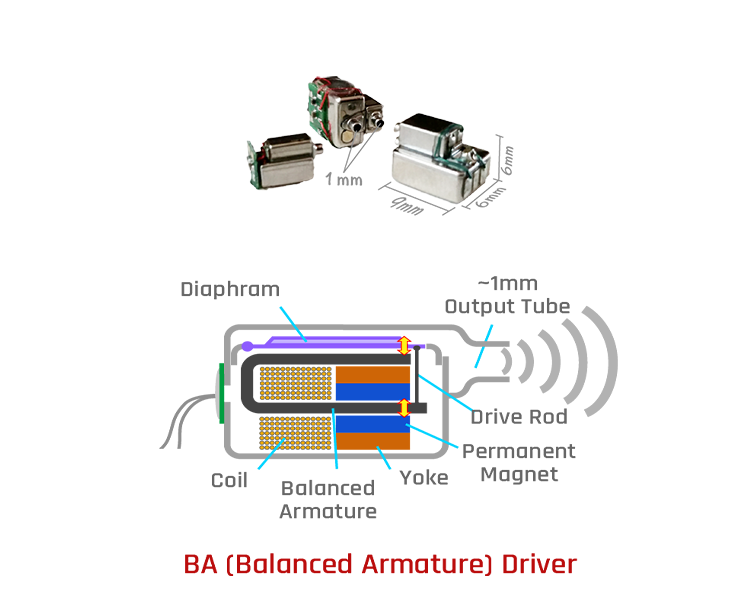
In such a high-humidity environment, the balanced armature drivers inside the earphones tend to accumulate moisture, and sometimes even form droplets. This buildup of moisture or liquid water within the drivers is one of the main causes of custom in-ear monitor failure. Even more concerning is that before the drivers completely break down, they may already begin to affect sound quality—posing a potential problem for music production, rehearsals, or performances.
Once inside, moisture can cause:
● Reduced volume
● Distortion
● Short-circuiting
● Lower electrical impedance
● Corrosion of internal components
● Complete driver failure
Without immediate moisture removal, the BA driver can become permanently damaged. This is why moisture prevention and proper drying are critical for the longevity of custom earphones and hearing aids.
How does liquid water enter sealed BA drivers?
For a BA driver to perform optimally, the ear canal must be well-sealed. But this same seal traps warm, humid air inside the ear canal. The BA driver, sitting deep inside the earphone housing, stays relatively cool because its metal casing is not directly exposed to the warmth of the ear.
When the ear’s hot, humid air travels into the BA driver through the sound tube, it encounters the cooler metal surface. This temperature difference causes the moisture to condense into liquid water on the driver’s internal components.
If the user sweats or moisture enters the outer ear canal, humidity rises even further—leading to faster and heavier condensation inside the BA driver.
How can liquid water and moisture be removed from the BA drivers?
To remove liquid water from a BA driver, the water must first evaporate into vapor. While evaporation occurs naturally at room temperature, the process is slow.
Drying can be accelerated by creating a strong humidity gradient:
● When the air outside the BA driver is much drier than the air inside, moisture moves outward rapidly.
● This diffusion continues until both sides reach the same humidity level.
● If the surrounding air is kept constantly dry, liquid water inside the BA driver will continue evaporating until the interior is completely dry.
Why can't I use a household electronic dry box to dehumidify my custom earphones or hearing aids?
Most people store their professional earphones or hearing aids in a household electronic dry box. However, dry boxes are designed primarily for storage, not active dehumidification.
When moisture enters the BA driver, it cannot be wiped off or reached manually. The driver is sealed inside a metal case connected only by a long, narrow & winding sound tube. Heating is not an option—BA drivers cannot be dried by raising temperature.
Effective moisture removal depends entirely on creating a low-humidity environment around the earphones.
Household dry boxes fail for three reasons:
They are too large.
Even the smallest dry box is typically 30 liters or more—far too much volume to efficiently reduce humidity for just one small pair of earphones.
They contain other objects.
Other stored items release moisture, competing for the dry box’s dehumidifying capacity.
In this scenario, the BA driver behaves like a sealed cup of water with only a pinhole, while other objects behave like open cups.
The BA driver remains wet until everything else dries first—which may take many hours or even days.
Dry boxes cannot accelerate BA driver evaporation.
Because the BA driver is sealed deep inside the device, natural evaporation is extremely slow, and the dry box cannot create the rapid humidity gradient required for true drying.
This is why household dry boxes are ineffective for drying BA drivers.
How does the ACS Revivo 2 effectively dry the BA Driver?
The ACS Revivo 2 is designed specifically for removing moisture from custom earphones and hearing aids. Its effectiveness comes from its compact, controlled environment and active humidity management.
Key features:
1. Optimized internal volume (≈0.3 liters)
A small chamber allows the Revivo 2 to rapidly reduce and maintain low humidity, something large dry boxes cannot achieve.
2. High-airflow circulation
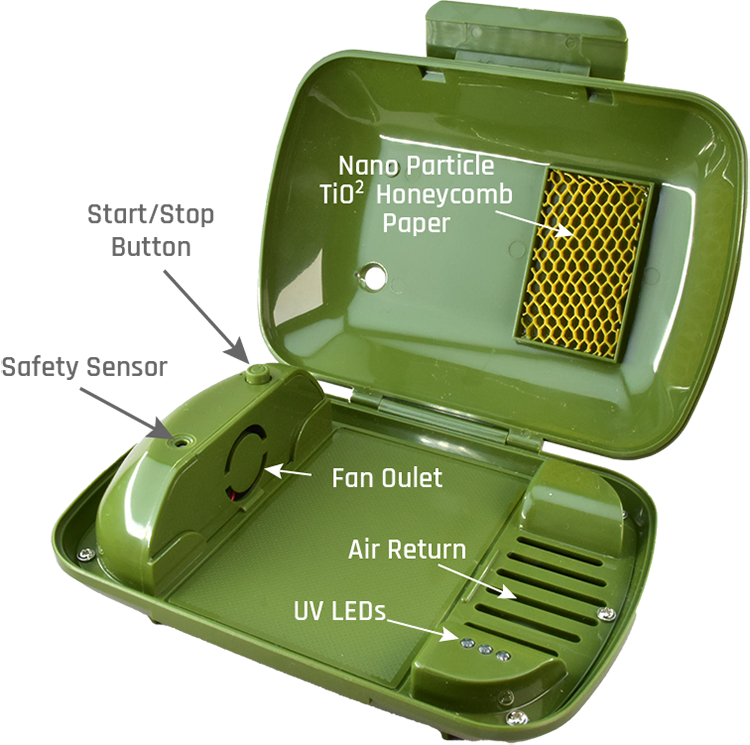
A powerful fan circulates air throughout the chamber. Earphones are placed near the fan outlet so that dry air continuously flows around the BA driver’s sound tube, pulling moisture outward.
3. Desiccant-assisted moisture removal
At the return air inlet, a specialized desiccant capsule absorbs moisture from the circulating air.
This dries the airflow before it is recirculated through the system again.
4. Continuous evaporation and diffusion
As dry air repeatedly passes over the earphones:
● Moisture evaporates from inside the BA driver
● It enters the air stream
● The desiccant removes it
● The cycle repeats
This ensures the BA driver and internal electronics dry completely and efficiently, preventing corrosion and prolonging the life of custom earphones and hearing aids.
Special Attention To Earphone Maintenance For Professional Artists, Musicians, and Singers
For professional performers, custom in-ear monitors are an essential part of every rehearsal and live show. However, intense singing, energetic performance, and stage lighting can cause heavy sweating, creating a hot and humid environment inside the ear canal.
This elevated moisture level can become trapped inside the BA drivers of your earphones. When humidity condenses into liquid water, it becomes one of the most common causes of failure in custom earphones.
Maintenance After Each Use
To protect your custom earphones, follow this procedure after every rehearsal or performance:
Wipe off sweat from the exterior surface of the earphones using a clean, dry cloth.
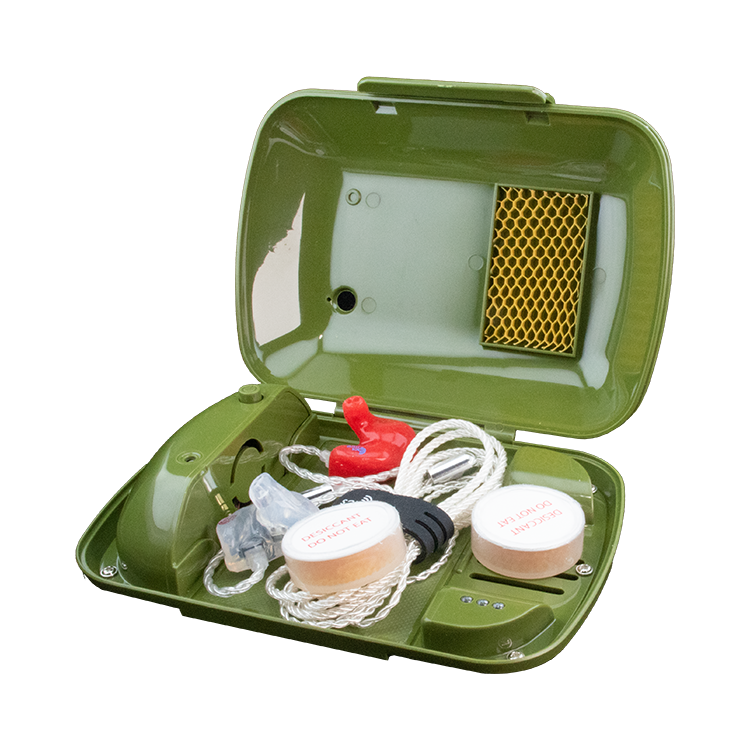
Place the earphones into the Revivo 2 along with two fresh orange desiccant capsules, exactly as shown in the reference picture.
Adjust the maintenance cycle time based on daily humidity conditions.
After a full day of use, we recommend doubling the standard 8-hour cycle to 16 hours.
This can be set by starting the Revivo 2, then pressing the Start button eight times. If you need the earphones again the next day, try to complete as much of the maintenance cycle as possible before use.
Consistently inspecting your earphones and keeping them fully dried is essential for maximizing their lifespan and long-term audio performance.
Storage After Maintenance
Once the Revivo 2 maintenance cycle is complete, the earphones should be stored in a dry, controlled environment, recommended Storage Options:
Electronic dry box
Store your earphones in an electronic dry box to maintain a stable, low-humidity environment.
Vacuum-sealed food storage container
(if you do not own a dry box), place the earphones inside and remove the air to create a vacuum. Insert one orange desiccant capsule as a visual humidity indicator: Orange = Dry; Green = Moisture entering due to air leakage.
Although these steps cannot guarantee that earphones will never fail, they significantly reduce the risk of moisture-related damage and help maintain performance reliability for professional use.
For a professional performer, wearing custom earphones during rehearsals or live shows can be the highlight of the day. However, intense singing and playing can lead to profuse sweating, making the ear canal hot and humid.
This high moisture level may get trapped in the earphones' BA drivers, occasionally condensing into water. Moisture or water trapped inside the earphone's BA driver unit is a common cause of failure in custom earphones.
Revivo 2 Uses Advanced Photocatalytic Reaction For Disinfection & Cleaning
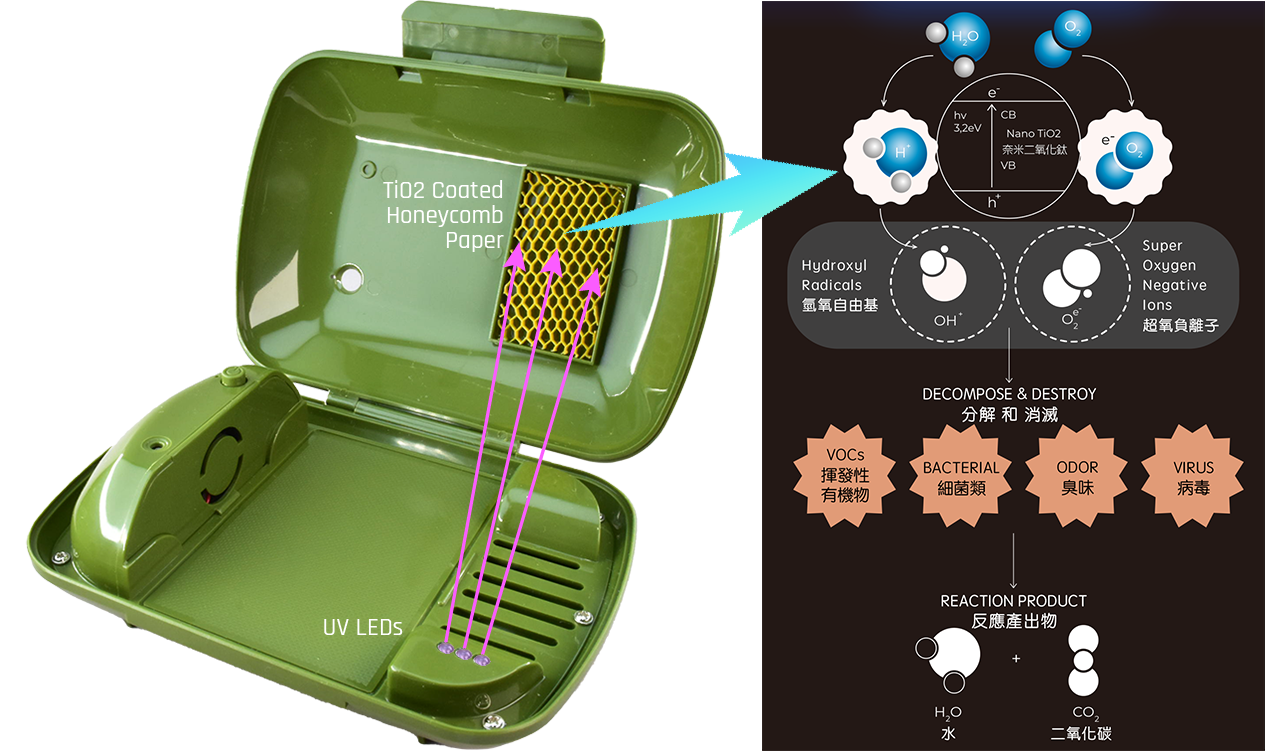
The Revivo 2 features a honeycomb paper inside its top cover, coated with nano-grade titanium dioxide, which significantly increases the titanium dioxide's physical contact area. It is equipped with three UV LEDs that emit a 380 nm wavelength, positioned on the device's tray.
During operation, these LEDs illuminate, and the UV light activates the titanium dioxide particles on the honeycomb paper. This triggers a photocatalytic reaction, decomposing nearby oxygen and water molecules into highly reactive superoxide ions (O-, O2-, O3-) and hydroxyl radicals (OH-).
These superoxide ions and hydroxyl radicals effectively break down harmful organic substances such as viruses, bacteria, odors, oils, and dirt, transforming them into harmless carbon dioxide (CO2) and water (H2O).
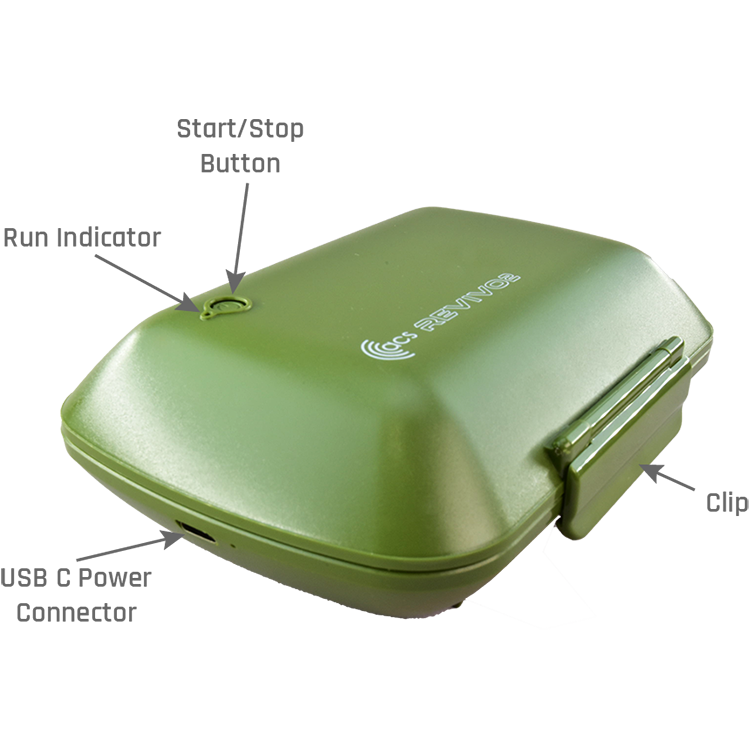
Component Description and Location
Operating Instructions
1. Arrange your earphones with the earphone cable and place them in the flat area of the Revivo 2 inner tray.
2. Peel off the aluminum foil from the desiccant capsule with the paper-covered side facing up. Place it on top of the rectangular opening at the end of the inner tray.
3. Close the lid and press firmly on the clip until it snaps shut. 4.
Press and hold the start button for 3 seconds until the blue light next to it lights up. At this point, Revivo 2 has started the standard maintenance cycle time and will automatically stop after 8 hours and return to standby mode.
Increase The Cycle Time
If you feel that the earphones sounded strange or that the earphones are particularly moist when you take them off. You can increase the cycle time of Revivo 2 to do powerful dehumidification. The way to increase the cycle time is very simple. After the Revivo 2 is running (the run indicator is on), you can increase the cycle time by 1 hour each time you press the Start button. Usually, we recommend adding 4-8 hours for a12-16 hours of total cycle time.
Built-In Safety Function
Because the internal UV LED will light up during operation, and direct exposure to UV light will damage your eyesight, there is a special safety design to prevent operation when the lid is opened. If you find that the fan is still running or the UV LED is still lit after the lid is opened, close the lid immediately and press and hold the start button for 3 seconds to stop Revivo 2 from running, then contact an ACS-approved dealer for repair.
Restoring The Desiccant Capsule
The orange desiccant is sealed with aluminum foil at the factory, do not unseal it before use to prevent the desiccant from absorbing moisture in the air and becoming ineffective.
When the desiccant starts to absorb moisture, it will gradually turn from orange to green, and when it completely turns dark green, it means the desiccant has been saturated. You only need to restore it, and then you can reuse it. You do not need to throw it away.
After restoring, the desiccant will turn back to orange, and its color may be slightly darker than the new desiccant. Because it is no longer sealed with aluminum foil, it must be stored in a home food dry-storage box that can be vacuumed, or it will quickly turn green again.
General Household Microwave Oven Refresh Method
Place the desiccant capsule (one) with the paper seal facing up in the center of the turntable. Set the microwave to high power for 45-60 seconds to restore the desiccant. Because each desiccant capsule absorbs different amounts of moisture, it is difficult to control the heat and time when multiple capsules are mixed together. Restoring only one capsule at a time is recommended.
Each microwave oven has different output power, so when restoring for the first time, please reduce the heat or shorten the time and adjust it according to the restoration condition. Using too much heat or too long a time may cause the desiccant capsule to burst or scorch the desiccant pellets.
Each time the desiccant is restored, the desiccant pellets inside the capsule will get slightly scorched, so after repeated restoration, the orange color of the capsule will become darker and darker, which means that its dehumidification efficiency begins to deteriorate and therefore needs to be replaced.
For your convenience, you can also purchase desiccant from this website so that your maintenance schedule will not be affected by the saturation of the desiccant. To purchase, please click BUY DESICCANT.