{{ 'fb_in_app_browser_popup.desc' | translate }} {{ 'fb_in_app_browser_popup.copy_link' | translate }}

{{ 'in_app_browser_popup.desc' | translate }}

Revivo Custom Monitors Desiccator & Sanitizer Instructions

Why Should I Use ACS Revivo, Instead Of A Household Electronic Dry Box?

What are the most common causes of failure of custom earphones and hearing aids using BA drivers?
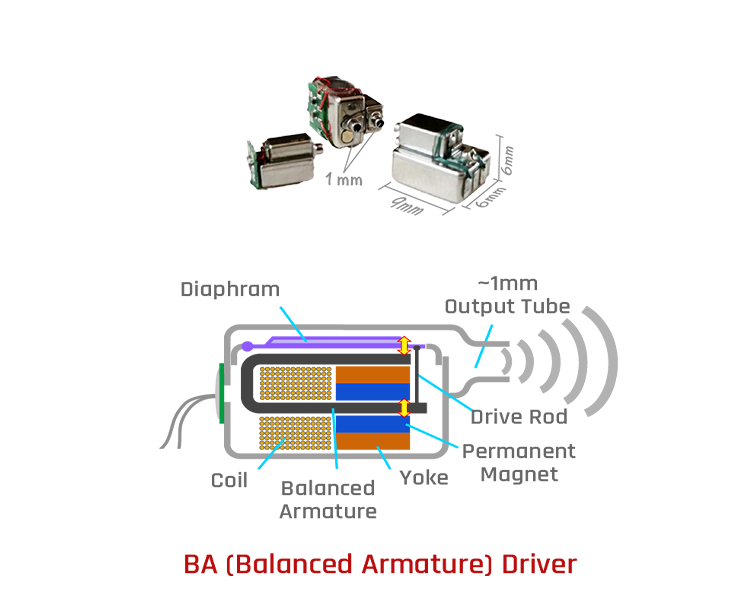
High-end custom earphones and hearing aids use miniature speakers called "balanced armature drivers," commonly referred to as "BA drivers." A typical BA driver consists of a sealed metal box and a ~1 mm diameter sound output tube (see the accompanying diagram). Because BA drivers produce high output audio with low distortion, they are the preferred component for high-end earphones and hearing aids.

The output tube of the BA driver is connected to a flexible sound transmission tube made to fit the shape of each person's ear canal. When moisture and liquid water are present inside the BA driver, the thin and small aperture structure of the tube prevents the moisture and liquid water from escaping quickly. As a result, it accumulates inside the BA driver, resulting in low output, distortion, short circuit, low impedance, component corrosion, etc. If the accumulation is not corrected, the custom earphones or hearing aids will fail completely.

Typical Balanced Armature Driver

How does liquid water enter sealed BA drivers?
The BA driver must work in a sealed ear canal to produce perfect sound quality. Unfortunately, a closed ear canal also means hot, humid air. And since the BA driver is usually mounted deep in the earphone's housing. Its metal case does not directly contact the hot, moist air. So the temperature of the metal case is relatively low.
When the hot and humid air enters the BA driver through the sound transmission tube, it will condense when it touches the cold metal body. And form a thin layer of liquid water on the metal surface. In addition, if the wearer's sweat seeps into the ear canal, the moisture concentration inside the ear canal will become higher, and the amount of liquid water condensed will increase.


How can liquid water and moisture be removed from the BA drivers?
Liquid water in a BA driver must evaporate into moisture before it can be removed. Although liquid water will evaporate at room temperature, its evaporation rate is meager. Suppose we can quickly move the moisture out of the  BA drivers. In that case, the liquid water evaporation rate will increase.

Assuming we can make the air outside the earphone much drier than the air inside the BA driver. The higher moisture air inside the BA driver will quickly diffuse into the low moisture outside air. It will continue to diffuse until the humidity inside and outside is equal. Therefore, this diffusion effect will continue if we can continuously remove moisture from the outside air to maintain a lower humidity. The liquid water in the BA driver will keep evaporating until it becomes dry.


Why can't I use a household electronic dry box to dehumidify my custom earphones or hearing aids?
After using expensive equipment such as high-end custom earphones or hearing aids, people will put them into a household electronic dry box for dry storage. The point is that the dry box's primary function is dry storage and is not dehumidification. Therefore, no one will put equipment dripping wet with water directly inside the dry box. Usually, they will dry all the water and only then put it in. The problem is that when there is water inside the BA driver, you can't wipe it dry. Also, the BA driver's sealed metal box can only connect to the outside of the earphone through a long and curvy sound transmission tube. Therefore, even if there is only moisture inside the BA driver, it is already challenging to get rid of it, let alone liquid water.

As mentioned earlier, the BA drivers are deep inside the earphone housing, so we can't increase the evaporation rate of liquid water by heating them. We can only rely on natural evaporation to dehumidify. The most effective way to dehumidify the BA driver is to lower the humidity outside the earphone than inside the BA driver. That way we can rely on the diffusion effect to make the liquid water in the BA driver evaporate quickly and then discharge to the outside.

The problem is. Even the smallest household dry box has a capacity of more than 30 liters. Of course, no one would use such a large box for a pair of earphones, meaning there would be other items in the box. Compared to other items, the BA driver is like a small glass of water sealed with a film that has only a pinhole to vent it. In contrast, other items are large glasses of water without any sealing film. We can imagine that the humidity inside the BA driver will hardly change before the moisture of other items is completely removed. This is why a household electronic dry box is not suitable for drying custom earphones or hearing aids.

How does the ACS Revivo 2 effectively dry the BA Driver?
The interior space of Revivo 2 is only about 0.3 liters so it can control the humidity of the air inside efficiently. We use a high airflow fan to circulate the air inside. The custom headphones or custom hearing aids are placed on a platform next to the fan outlet. As the fan blows dry air through the unit, the moisture deep inside the moving iron unit diffuses into the dry air stream outside due to the difference in moisture concentration.

The moisture in the air stream is absorbed by the desiccant capsule placed at the return air inlet. The resulting dry air goes back to the fan under the platform and gets blown out again. 

The circulating dry air will continuously absorb the moisture diffused from the earphone. It causes the liquid water inside the BA driver to evaporate into moisture, which then diffuses outward. This continuous cycle will dry the BA drivers and electronic components of the earphones and hearing aids.

Revivo Features

In-ear monitors and hearing aids utilize miniature balanced armature speakers. Because they are worn in a closed-ear canal, sweat and moisture can enter the speakers, causing dysfunction or malfunction. Bacteria growth due to moisture can also cause itching, rash, skin inflammation, and other health problems. ACS Revivo is a product designed to dry, disinfect and clean these products.

Dehumidification and Drying
Revivo uses a high-speed fan to rapidly circulate the internal air and use the desiccant to reduce the humidity of the Revivo's internal air quickly. The moisture hidden deep inside the tiny balanced armature speaker is transferred to this dry air by diffusion.

Photocatalytic Reaction
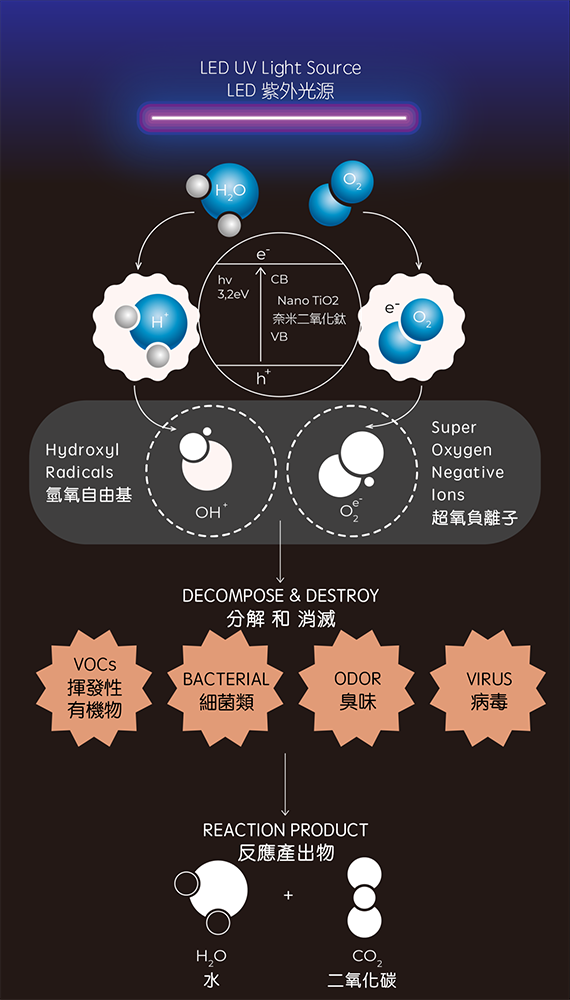
The built-in UV LED shines on honeycomb paper coated with nano-grade titanium dioxide, causing a photocatalytic reaction to decompose the water in the air, generating hydroxyl radicals superoxide ions to disinfect and clean in-ear monitors or hearing aids.

Adjustable Operation Cycle
The standard maintenance cycle for Revivo is 3 hours. If you used the device for an extended period, or you had sweated a lot while using it.  Then it would be best if you increased the running time of Revivo to remove the extra moisture. After turning it on (the blue light next to the button is lit), you can increase the running time by one hour each time you press the start button.

When using battery power,  you can freely adjust Revivo's maintenance schedule between 3 and 30 hours to accommodate your device's moisture and germ growth conditions. When using standard power (connected to a battery charger), you can freely increase the maintenance trip duration without limitation.

光觸媒反應, Photocatalytic Reaction

Operating Instructions

1.  Arrange your in-ear monitors with the cable and place them in the flat area of Revivo's inner tray.
2.  Remove the aluminum foil seal and place the desiccant paper covered side up on top of the rectangular openings on the side of the inner tray.
3.  Close the lid and press the clip firmly until it snaps into the locked position. 
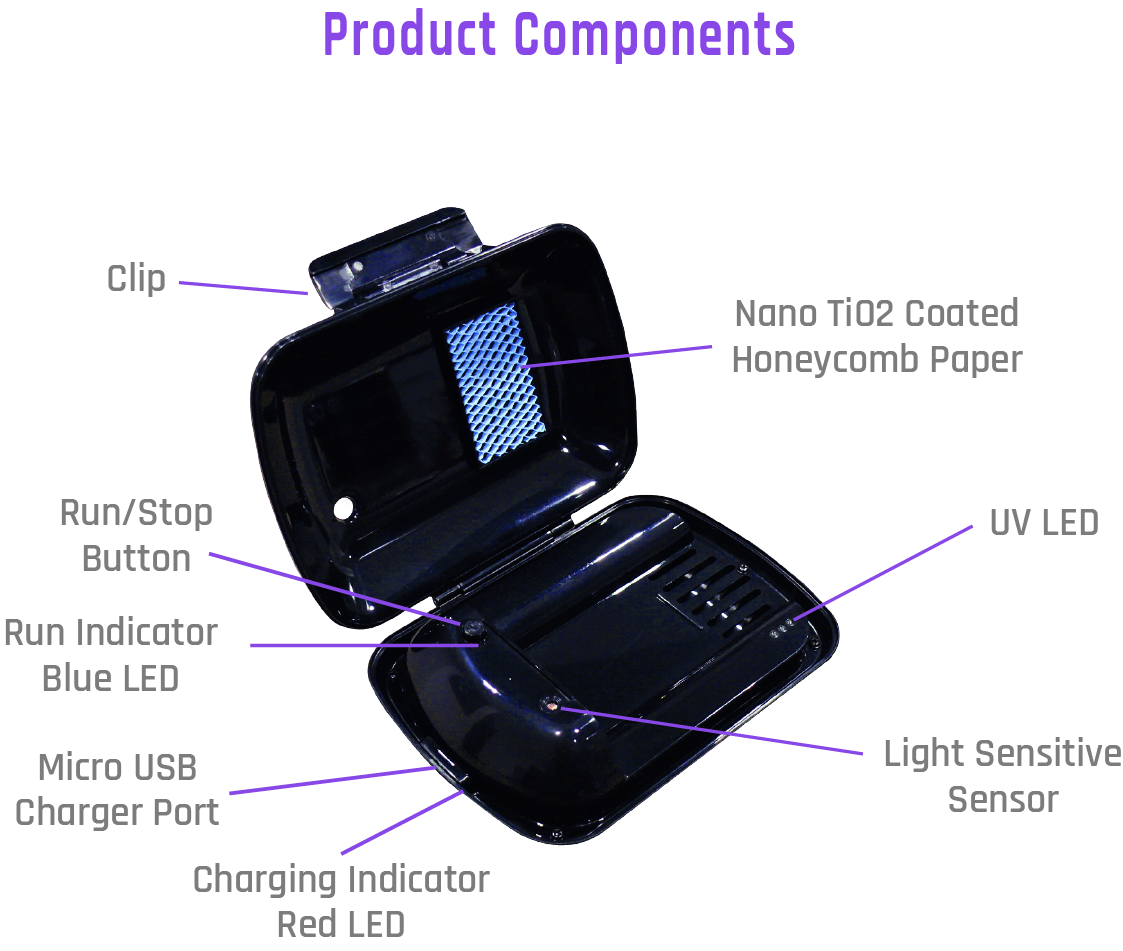
4.  Press and hold the Run/Stop button for 3 seconds until the Blue LED Run Indicator lights up. After 3 hours, it will stop automatically and return to standby mode.


Safety Features
Because the Revivo's internal UV LED will light up during operation, and a direct view of UV light can damage your eyesight, the Revivo has a safety design to prevent it from operating with the lid open. If you find that the fan is still running or the UV LED is on when the lid is opened, immediately close the lid and press and hold the Run/Stop button for 3 seconds to stop the Revivo from operating, then contact an ACS approved dealer to have it repaired.

Revivo Product Components

Maintenance of your Earphones after use
We strongly recommend that after each use of your custom earphones. First, dry the sweat on the outer surface of the earphones and put two fresh (orange color) desiccant capsules into the Revivo 2. Then increase the maintenance run time according to the humidity level of the headphones on that day. Our recommendation is to double the standard 8 hours run time to 16 hours after a full day of use.

Storage of earphones after maintenance
After the maintenance cycle, store the earphones inside an electronic dry box to keep dry. Find a suitable vacuum food storage container if there is no electronic dry box. Put the earphones inside the container and pump out the air, keeping the earphones dry. Such steps can reduce many headphone problems.

Charging Instructions

Your Revivo has received standard charging from the factory, but it may have run out of stored power during shipping and storage. If your Revivo's battery had run flat, it would take longer to charge for the first time.  Please connect the Micro USB power cable to a standard USB DC power source. Such as the USB port on computers or the chargers for smartphones or tablets.  Wait for 10-20 minutes until the Red charging indicator next to the Micro USB charging jack lights up, then keep charging for 10-12 hours until the Red charging light turns off.

A fully charged Revivo will provide approximately 30 hours of use. The standby/use time after the first few charges may be slightly less than the standard time.

Lower Battery Power

When the battery is low, the Blue indicator LED next to the Run/Stop switch will blink for 3 minutes every 10 minutes to remind you to charge the Revivo immediately.
The Revivo can operate directly with a USB power source and charge the battery at the same time.

Refreshing Desiccants For Reuse

The orange desiccant capsule is sealed with aluminum foil at the factory.  Unseal it just before use to prevent the desiccant from absorbing moisture in the air and becoming spent.

When the desiccant starts to absorb moisture, it will gradually turn from orange to green. When it turns into dark green, the desiccant inside is fully saturated. At this point, you only need to refresh it. Then you can reuse it. You do not need to throw it away.

After fresh, the desiccant pallets return to orange color. It is normal if the color is slightly darker than the brand new desiccant. Because the capsule is no longer sealed with aluminum foil, you can only store it in a vacuumed food storage box. Or it will quickly turn green again.  If you have a microwave oven, we recommend you refresh it just before using it.

Household microwave oven refresh method
Place a single desiccant capsule with the paper seal facing up in the center of the turntable and set the heat to high for 45-60 seconds to restore the desiccant. Because each desiccant capsule absorbs different amounts of moisture, it isn't easy to control the heat and time to refresh multiple capsules. Therefore, we recommended restoring only one at a time.

Each microwave oven has a different heat rating. When restoring for the first time, please reduce the heat, shorten the time, and adjust according to the restoration condition.  Using too much heat or too long a time may cause the desiccant to burst or scorch the desiccant pellets.

Each time the desiccant is restored, the pellets inside get slightly scorched. Therefore, after repeated refreshing, the orange color of the capsule will become darker and darker. This means that its dehumidification efficiency begins to deteriorate and therefore needs to be retired.

To facilitate your maintenance schedule without being affected by the saturation of the desiccant, our company has a 10-pack desiccant. To purchase, please click Buy Desiccant.